Scheduling Automation (Feed)
A PIM Feed eliminates the need for a user to first export and then upload a product information file or spreadsheet in order to send product information to a specific channel partner. PIMInto has the ability to automatically "feed" data to select external channel partners that support API connection points for receiving product data.


Create a New Feed
Creating a new feed is done by clicking on the Create New feed button on the feed management dialog.
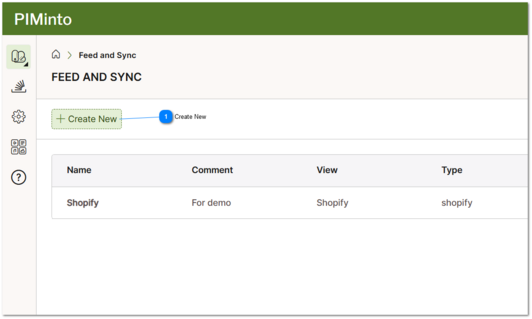
 Create New Creating a new feed is done by clicking on the Create New feed button on the feed management dialog. |
Scheduling Feed Execution Frequency
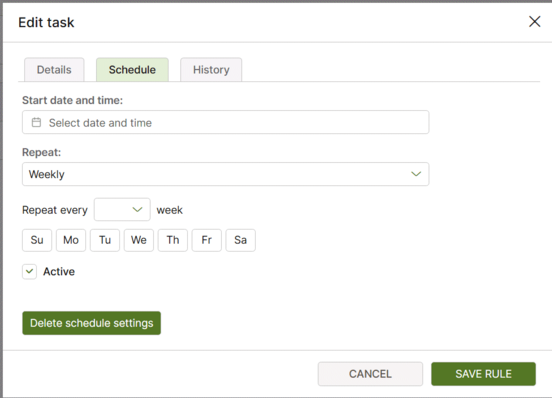
How of often a feed synchronizes can be scheduled on the feeds "Schedule" tab. Feed and Sync can run daily or every "X" days, weekly or every "X" weeks or monthly. Weekly tasks can run on specified days of the week.
Suggested Topics:
With MCP (Model Context Protocol) it is now easier than ever to connect to other Systems
over 14,000 different applications that PIMInto can share data with when paired with AI. AI can assist with sharing data between MCP server or generate import and export scripts that can easily be scheduled to share data between systems on demand.
Also see this example of using the built in API and AI to automatically generate a repeatable export using an automatically generated python script that can be scheduled with task manager.